By submitting, you consent to our use of your data. Privacy Policy.
Kategorie
KI-Agenten
Artikel teilen
An always-on agent is, by definition, something that spends while nobody is watching. That makes its meter more important than its price, and for OpenAI's dots, the meter is the one thing that has not been published yet.
OpenAI launched dots on 29 September: persistent agents inside ChatGPT that run on GPT-6 Astra, each with its own cloud computer, connected to more than 4,000 apps and working in the background between conversations. At the same event, it announced that ChatGPT Pro 200 will lose half its Codex and Work allowance from 30 October. Read separately, those are a launch and a pricing change. Read together, they describe a month in which the true cost of running an agent is hidden at exactly the moment the budget it draws on gets smaller.
What dots cost today
There is no separate dot subscription and no per-task charge at launch. Your first dot comes with the plan.
Plan | Price | Dots |
|---|---|---|
Pro 100 | $100 / month | First dot included |
Pro 200 | $200 / month | First dot included |
Pro 500 | $500 / month | First dot included, highest allowance, Ultrafast tier |
Business Premium | $125 / user / month ($100 billed annually) | First dot included |
Enterprise, Edu, Healthcare | Custom | Beta, enabled by a workspace admin |
Free, Go, Plus | Not applicable | No access |
That first dot is, for now, the only one. OpenAI says you will later be able to add more dots and pay to increase a dot's speed or monthly workload, but it has not published prices for either. Dots are also unavailable on Pro plans in the EEA, Switzerland and the UK at launch, although Business Premium customers in those regions do get them.
What actually counts against your limits
The launch coverage mostly repeated that running a dot does not count against your usage. That is true of one thing and not of the others.
Talking to your dot does not count toward your ChatGPT limits. That part is genuinely free.
Work your dot starts or manages in Codex or ChatGPT Work counts toward those products' limits, as normal. The useful output of an agent, the actual work, is metered from day one.
Dot usage during the launch month is treated generously, but the details shifted on launch night. One version of OpenAI's help centre said dot usage would not count toward plan allowances at all for the first month. A later version described an included allowance with extended launch-month limits. Either way, OpenAI says it will publish per-plan usage terms after that window.
So the honest summary is that conversation is free, work is billed, and the long-term rate for the work a dot does on its own has not been announced.
Why the Pro 200 timing matters
From 30 October, Pro 200 changes shape without changing price.
Pro 200 | Until 29 October | From 30 October |
|---|---|---|
ChatGPT Work and Codex | 20x the Plus allowance | 10x the Plus allowance |
GPT-6 Pro messages | 200 a week | 100 a week |
Price | $200 / month | $200 / month |
Existing subscribers keep their current limits until 29 October and receive a one-time grant of 62,500 usage credits, valued at $2,500, that expires on 31 December. OpenAI's Codex engineering lead described the new plan as "half the dollar in API spend" of the old one. Subscribers have not been quiet about it: the community thread on the change is titled "Pro 200 is fine, please don't improve it."
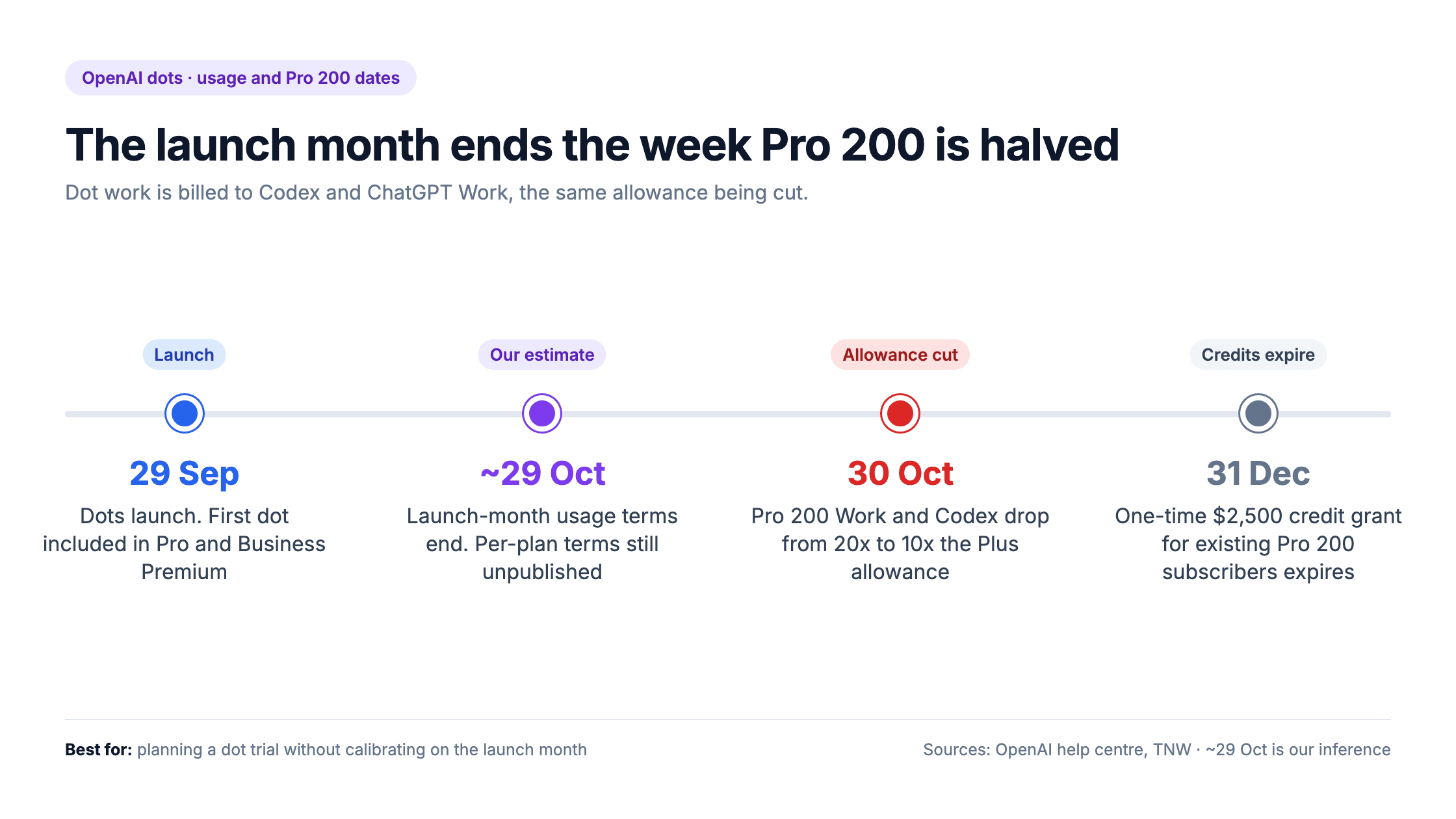
Now put the two dates side by side. Dots launched on 29 September, so the launch month ends around 29 October, which is our inference rather than a date OpenAI has published. Pro 200's Codex and Work allowance halves the following day. Those are precisely the products where a dot's work is billed.
Anyone on Pro 200 who sets up a dot this month is calibrating against conditions that will not last: generous launch-month treatment for the dot, and double the Codex and Work allowance it will spend from. Both end within roughly a day of each other.
What we still don't know
Four numbers that decide whether a dot is good value have not been published:
1. The permanent usage allowance for a dot on each plan
2. The price of a second dot
3. The price of more speed or a larger monthly workload
4. Any cost per task for the background work a dot does on its own
Dots run on GPT-6 Astra, which costs $10 per million input tokens and $50 per million output through the API, but that does not translate into a cost per dot task, because a single piece of agent work involves many model calls and tool actions. This is the same gap between a token rate and a real bill that runs through every agent purchase, and it is why we look at cost per task rather than price per token.
There is a little history worth knowing too. In May, Codex users reported allowances draining far faster than expected, which OpenAI traced partly to runaway background workers and duplicated tool results. It fixed both and added safeguards that it said would make allowances last 10% to 50% longer. Background work is the hardest kind of usage to see, and therefore the kind most worth watching.
How to plan for it
If your team is evaluating dots, five things keep the launch month from setting false expectations:
Don't calibrate on October. Treat any usage you see before 30 October as a floor, not a forecast.
Watch the Codex and Work meters, not the dot. That is where a dot's real work is billed, and where Pro 200's allowance is shrinking.
Separate exploration from production. A subscription allowance suits individuals trying things out. Recurring business work belongs somewhere its cost per task is visible and stable.
Put 30 October and 31 December in the calendar. One is the allowance cut, the other is when the credit grant expires.
Revisit when OpenAI publishes per-plan terms. That announcement, not the launch, is when a dot's real price becomes knowable.
For recurring business processes, the more durable approach is to choose the model for each step deliberately, so cost follows the work rather than a subscription's terms. That is the logic behind assigning models per agent step. In Beam, each step in a workflow carries its own model, with sensible defaults and automatic fallback and retry, so a high-volume step can run on an efficient model and the steps that need more capability can have it. Where your agent can reach the people it works for matters too, and is a separate question from what it costs.
Common questions about OpenAI dots usage
How much does an OpenAI dot cost?
Your first dot is included at no extra cost in ChatGPT Pro 100, Pro 200, Pro 500 and Business Premium. It is currently the only dot you can have. OpenAI plans to sell additional dots and upgrades to a dot's speed or workload, but has not published prices. Free, Go and Plus plans do not include dots.
Do dots count against my ChatGPT usage limits?
Conversations with your dot do not count toward ChatGPT limits. Tasks your dot starts or manages in Codex or ChatGPT Work do count toward those products' limits, as normal. During the launch month, dot usage is treated more generously, and OpenAI says it will publish permanent per-plan terms afterwards.
What is changing with ChatGPT Pro 200?
From 30 October, Pro 200's ChatGPT Work and Codex allowance drops from 20 times to 10 times the Plus allowance, and GPT-6 Pro messages fall from 200 to 100 a week. The price stays at $200 a month. Existing subscribers keep current limits until 29 October and receive a one-time $2,500 credit grant that expires on 31 December.
Are dots available in Europe and the UK?
Not on Pro plans at launch. Dots are unavailable on Pro in the EEA, Switzerland and the UK, but Business Premium customers in those regions can use them. Enterprise, Edu and Healthcare workspaces have dots in beta, switched on by an administrator.
Should I use dots for business-critical work?
Treat the launch month as a trial. Dot conversations are free, but the work a dot does in Codex and ChatGPT Work is billed, permanent usage terms are unpublished, and Pro 200's allowance halves on 30 October. For recurring business processes, use infrastructure where the cost of each task is visible and the model for each step is your choice.