9 min leer
5 métricas de producción de agentes de IA que le faltan a tu panel de control


By submitting, you consent to our use of your data. Privacy Policy.
Categoría
Agentes de IA
Compartir artículo
Un agente de IA puede reportar un 99,9% de tiempo de actividad (uptime) y seguir equivocándose la mitad de las veces. Ese es el problema fundamental de monitorizar los agentes de IA de la misma manera que se monitoriza el software tradicional.
Las métricas de infraestructura, el tiempo de actividad, la latencia, las tasas de error y el rendimiento (throughput) le indican si el agente está funcionando. No le dicen si está funcionando bien. Un agente de procesamiento de reclamaciones que aprueba automáticamente cada solicitud está operando técnicamente. También está perdiendo dinero a raudales. Un agente de verificación KYC que marca el 70% de las solicitudes para revisión manual nunca se va a "caer", pero tampoco está haciendo su trabajo.
Los equipos de desarrollo de agentes de IA en producción que escalan más allá de la fase piloto realizan el seguimiento de un conjunto diferente de métricas. Estas cinco son las que la mayoría de los equipos añaden después de que su primer incidente en producción les enseñe que el tiempo de actividad no es suficiente.
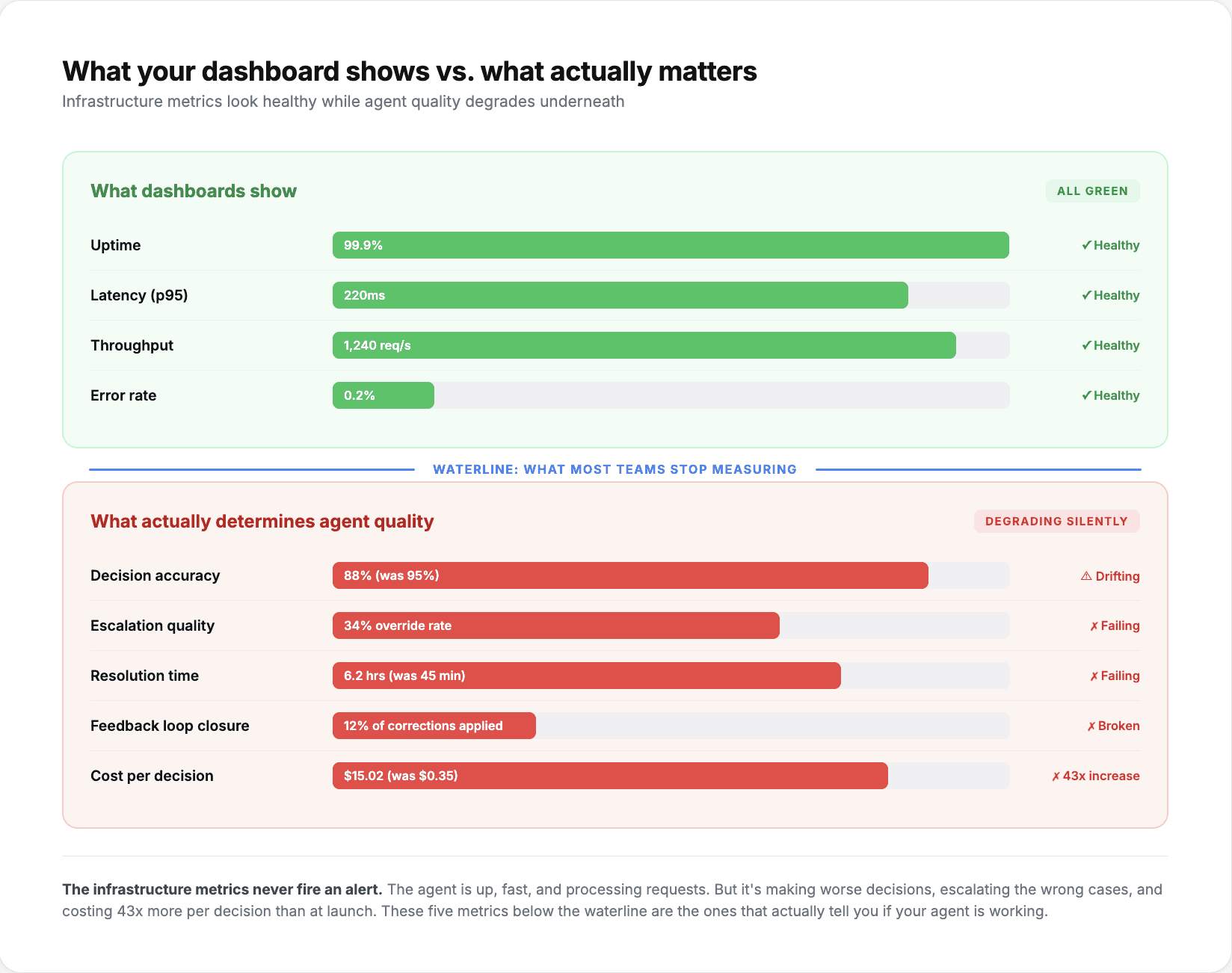
1. Precisión de las decisiones a lo largo del tiempo (no solo en el lanzamiento)
La mayoría de los equipos miden la precisión durante las pruebas y en el lanzamiento. Pocos la miden continuamente en producción. Esta es la métrica que detecta el modo de fallo más común: la degradación gradual.
Un agente que se lanza con una precisión del 95% en la conciliación de facturas podría estar en un 88% tres meses después. No porque el modelo se haya degradado, sino porque la distribución de entrada ha cambiado. Un nuevo proveedor comenzó a enviar facturas en un formato diferente. Un cambio de política introdujo un nuevo flujo de trabajo de aprobación para el que el agente no estaba entrenado. Los patrones estacionales crearon volúmenes de transacciones fuera del rango de entrenamiento.
La solución es sencilla: muestrear las decisiones del agente a intervalos regulares, compararlas con la realidad de referencia revisada por humanos y realizar un seguimiento de la línea de tendencia de precisión. Las plataformas con capacidades de autoaprendizaje automatizan este bucle de retroalimentación. Un neobanco europeo que utiliza agentes de KYC mantiene la precisión en un 95,7% porque el sistema se adapta continuamente a nuevos tipos de documentos y variaciones normativas en lugar de esperar a una actualización manual del modelo.
Qué monitorizar: Tasa de precisión semanal por flujo de trabajo. Alerta cuando la precisión caiga más de 3 puntos porcentuales por debajo de la media de 30 días. Segmente por tipo de entrada si es posible, ya que la precisión agregada puede enmascarar la degradación específica de una categoría.
2. Calidad de la derivación (no solo tasa de derivación)
La tasa de derivación le indica cuántas decisiones pasó el agente a un humano. La calidad de la derivación le indica si esas derivaciones estaban justificadas.
Existen dos modos de fallo. Una baja tasa de derivación (under-escalation) significa que el agente está tomando decisiones que no debería tomar. Una alta tasa de derivación (over-escalation) significa que el agente está devolviendo tareas rutinarias a los humanos, lo que anula el propósito de su implementación. La mayoría de los equipos realizan un seguimiento de la tasa general de derivación (p. ej., "nuestro agente deriva el 12% de las reclamaciones"). Muy pocos hacen un seguimiento de lo que ocurre después de la derivación.
La métrica verdaderamente relevante es la tasa de anulación humana en decisiones derivadas. Si un agente deriva una reclamación y recomienda su denegación, y el gestor la revisa y también la deniega, la derivación fue correcta. Si el gestor revierte la recomendación el 40% de las veces, los criterios de derivación del agente necesitan un ajuste.
Las implementaciones empresariales que procesan más de 10 millones de tareas realizan este seguimiento a nivel de flujo de trabajo. Un agente bien optimizado debería tener una tasa de anulación inferior al 15% en las decisiones derivadas. Un porcentaje superior al 25% significa que la lógica de derivación necesita un reentrenamiento, no solo un ajuste de umbral.
Qué monitorizar: Tasa de anulación en decisiones derivadas, segmentada por flujo de trabajo y motivo de derivación. Alerta cuando la tasa de anulación supere el 20% para cualquier categoría de derivación individual.
3. Tiempo de resolución incluyendo los pasos humanos
El tiempo de procesamiento de extremo a extremo es la métrica que expone los cuellos de botella ocultos en el flujo de trabajo híbrido entre humanos y agentes.
A menudo, los equipos miden el tiempo de procesamiento del agente de forma aislada: "el agente procesa una factura en 4 segundos". Pero el tiempo real desde el envío hasta la resolución puede ser de 6 horas porque el agente la derivó, la derivación permaneció en una cola durante 3 horas, un humano la revisó en 12 minutos y la notificación de resolución tardó otras 2 horas debido a un proceso por lotes.
La velocidad del agente es irrelevante si el flujo de trabajo general es lento. La métrica que importa es el tiempo de resolución medido desde el momento en que una tarea entra en el sistema hasta el momento en que se completa, incluyendo todos los pasos humanos, los tiempos de espera en cola y los procesos posteriores (downstream).
Los equipos de seguros que redujeron el procesamiento de reclamaciones de 60 días a 3 días no lo lograron acelerando el agente. Lo consiguieron rediseñando el flujo de trabajo para que las reclamaciones gestionadas por el agente omitan por completo la cola manual, y las reclamaciones derivadas lleguen con el contexto suficiente para que la revisión humana tarde minutos en lugar de horas.
Qué monitorizar: Mediana del tiempo de resolución por flujo de trabajo, desglosada en: tiempo de procesamiento del agente, tiempo de espera/cola, tiempo de revisión humana y tiempo de procesamiento posterior. Alerta cuando la mediana del tiempo de resolución aumente más de un 20% semana tras semana.
4. Tasa de cierre del bucle de retroalimentación
Cuando un humano corrige la decisión de un agente, ¿mejora esa corrección las decisiones futuras? Esta es la métrica que separa a los agentes que aprenden de los agentes que repiten errores.
En sistemas sin bucles de retroalimentación, una corrección humana es una solución puntual. El agente volverá a cometer el mismo error ante entradas similares la próxima vez. En sistemas con bucles de retroalimentación, cada corrección es una señal de entrenamiento. Con el tiempo, la tasa de error en ese patrón específico disminuye. La pregunta es: ¿con qué rapidez?
La tasa de cierre del bucle de retroalimentación mide el porcentaje de correcciones humanas que resultan en una mejora medible de la precisión dentro de un plazo definido. Si un gestor corrige la decisión de un agente sobre un tipo específico de reclamación de automóvil y la precisión del agente en ese tipo de reclamación mejora dentro de un plazo de 30 días, el bucle se ha cerrado.
Las implementaciones con mecanismos de autoaprendizaje activos, como el neobanco que alcanzó un 95,7% de precisión en KYC mediante optimización iterativa, suelen mostrar un cierre del bucle de retroalimentación del 70-85% en un plazo de 30 días. Los sistemas sin aprendizaje activo muestran un 0%, porque las correcciones no se vuelven a introducir en absoluto en el modelo. Los equipos que dependen de actualizaciones trimestrales del modelo experimentan tasas de cierre del 20-30%, con meses de desfase entre la corrección y la mejora.
Qué monitorizar: Porcentaje de anulaciones humanas que conducen a una mejora medible de la precisión en un plazo de 30 días. Segmente por tipo de corrección para identificar de qué patrones de error el sistema está aprendiendo y de cuáles no.
5. Coste por decisión (no solo coste por llamada a la API)
La métrica más engañosa en la implementación de agentes es el coste por llamada a la API. Le indica el coste de infraestructura de ejecutar el modelo, pero ignora todo lo demás.
El coste por decisión incluye: el coste de la API/inferencia, el coste de recuperación de datos (extracción de registros de ERP, bases de datos o API), el coste de revisión humana para las decisiones derivadas y el coste de corrección de errores cuando el agente se equivoca. Una decisión que cuesta 0,02 $ en llamadas a la API pero que activa una revisión manual de 50 $ el 30% de las veces, en realidad cuesta una media de 15,02 $ por decisión.
Los equipos empresariales que gestionan operaciones financieras a escala informan que reducir la intervención humana entre un 60% y un 80% en el primer mes se traduce en reducciones del coste por decisión de entre el 70% y el 90%. Pero el ahorro solo se materializa si las tasas de derivación se mantienen bajas y la precisión sigue siendo alta. Un modelo más barato que deriva con más frecuencia puede costar más por decisión que un modelo más caro que resuelve con mayor autonomía.
Qué monitorizar: Coste total por decisión, que incluye la mano de obra humana en derivaciones y correcciones de errores. Compárelo con el coste por decisión anterior a la implementación del agente para el mismo flujo de trabajo. Alerte si el coste por decisión aumenta mes a mes, lo que habitualmente señala un aumento de las tasas de derivación o una degradación de la precisión.
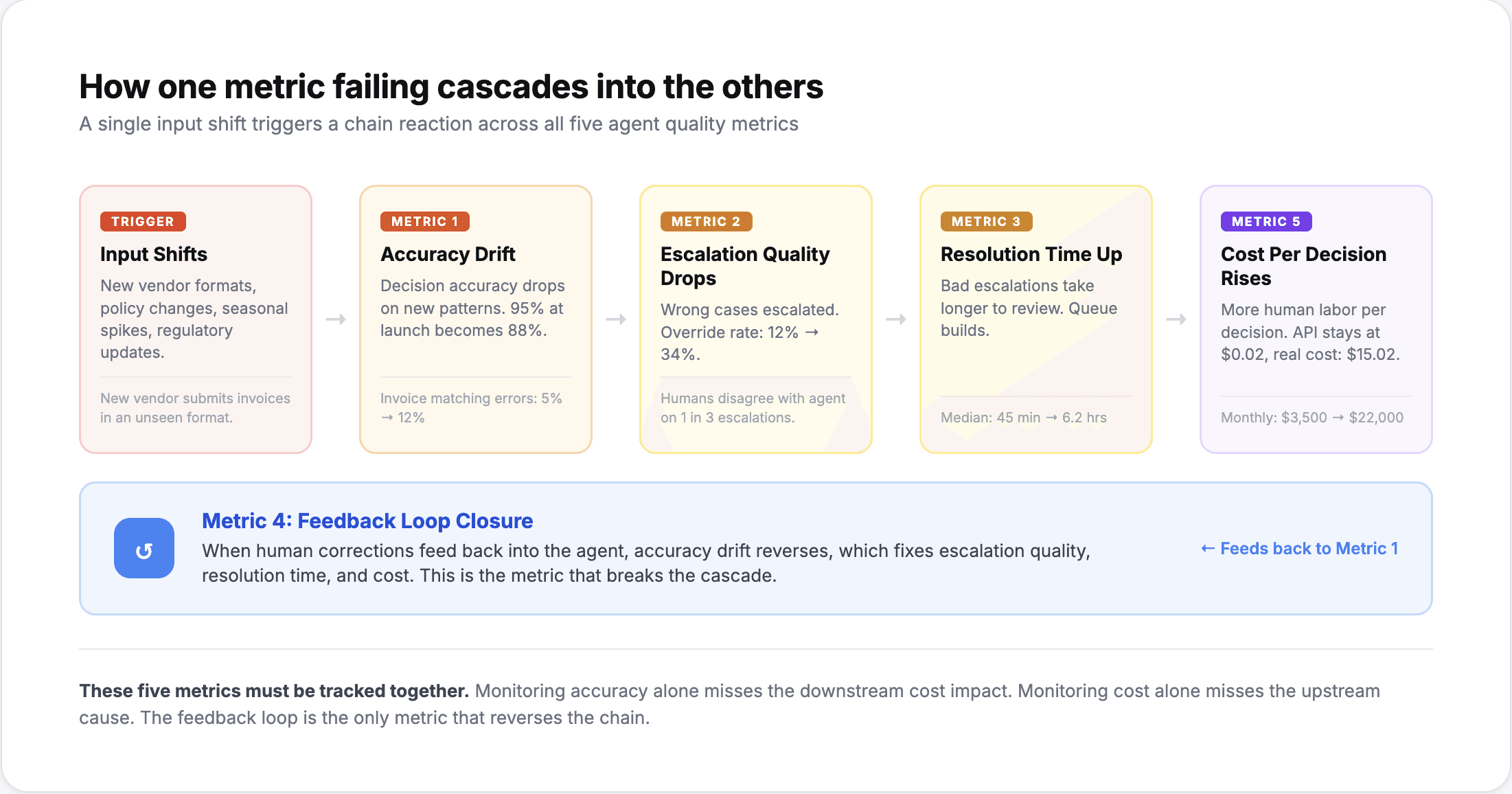
Construir una práctica de monitorización en producción
Estas cinco métricas comparten un tema común: miden si el agente está haciendo su trabajo correctamente, no solo si está funcionando.
La implementación práctica consiste en añadir estas métricas como una segunda capa por encima de su monitorización de infraestructura existente. Siga controlando el tiempo de actividad, la latencia y las tasas de error. Estos parámetros detectan interrupciones y regresiones de rendimiento. A continuación, añada las cinco métricas anteriores para detectar los fallos que la monitorización de infraestructura no puede ver.
La mayoría de las plataformas de agentes empresariales proporcionan cuadros de mando para el seguimiento de la precisión, el análisis de derivaciones y la contabilidad de costes. Si su plataforma no lo hace, la versión mínima viable es una revisión manual semanal: muestree 50 decisiones del agente, compárelas con el criterio humano, calcule la tasa de anulación de las derivaciones de esa semana y analice la tendencia de los resultados.
Los equipos que monitorizan bien son los que mantienen a sus agentes en producción más allá del primer trimestre. Los que solo vigilan el tiempo de actividad son aquellos cuyos agentes sufren una degradación silenciosa hasta que alguien nota el impacto empresarial, habitualmente demasiado tarde para solucionarlo sin una nueva implementación.