Introducing Auto Fill for Integrations
نقدم لكم ميزة التعبئة التلقائية للتكاملات — حيث يتم الآن تكوين خطوات التكامل الخاصة بك بشكل صحيح وتلقائي منذ أول عملية تعبئة. كما تأتي العقد الجديدة مجهزة مسبقاً بنهج التعبئة الصحيح لكل حقل، لتتمكن من الربط والبدء على الفور دون الحاجة لإجراء أي تعديل يدوي.
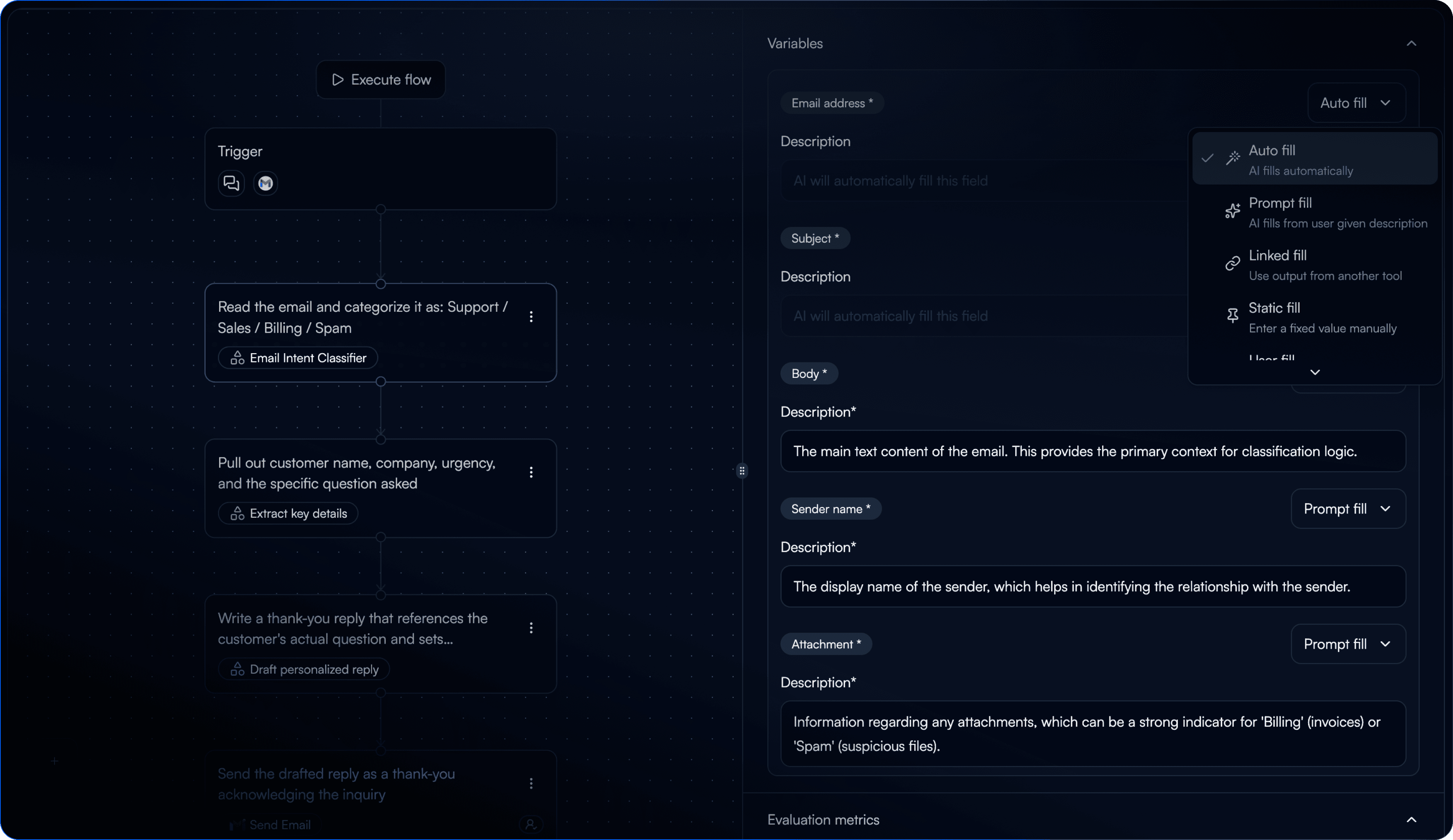
احصل على تعبئة دقيقة من المحاولة الأولى — لا مزيد من العودة لتعديل القيم الخاطئة حقلاً بحقل
تبدأ عقد التكامل الجديدة بوضع التعبئة الصحيح المحدد مسبقاً لكل حقل
يتم ملء حقول المعرّف (ID) وحقول التحديد مسبقاً بقيم حقيقية من حسابك المتصل
تجاوز وضع التعبئة لكل حقل في أي وقت باستخدام خيار "تلقائي" الجديد
تحسينات
تصفية المهام حسب التاريخ في صفحة قائمة المهام
عرض بيانات مدخلات المهمة الآن كعارض JSON في صفحة تفاصيل المهمة
البحث في التكاملات يعمل الآن مباشرة من حقل الإدخال — لا حاجة للنقر على "إضافة تكامل" أولاً
تم تغيير اسم "عقدة الإدخال" إلى "المُشغّل" في القائمة المنسدلة للمتغيرات المرتبطة
إصلاح الأخطاء
إعادة تسمية متغير في عقدة GPT لم يعد يؤدي إلى الكتابة فوق متغيرات الأوامر الأخرى
مُشغّل Gmail لم يعد يُنشئ مهاماً عند ضبطه على وضع "غير نشط"
مُشغّل البريد الإلكتروني يعمل الآن بشكل صحيح بعد إزالة التكامل وإعادة إضافته
مُصفي مجلد Outlook يعمل الآن بشكل صحيح عند تكوينه
تُحفظ سلاسل محادثات الدردشة الآن بشكل موثوق
صفحة مسار العمل لم تعد تظهر مؤشر التحميل مع كل نقرة